
Users
The Users page allows administrators to manage user accounts, including creating, editing, and managing access for all system users.
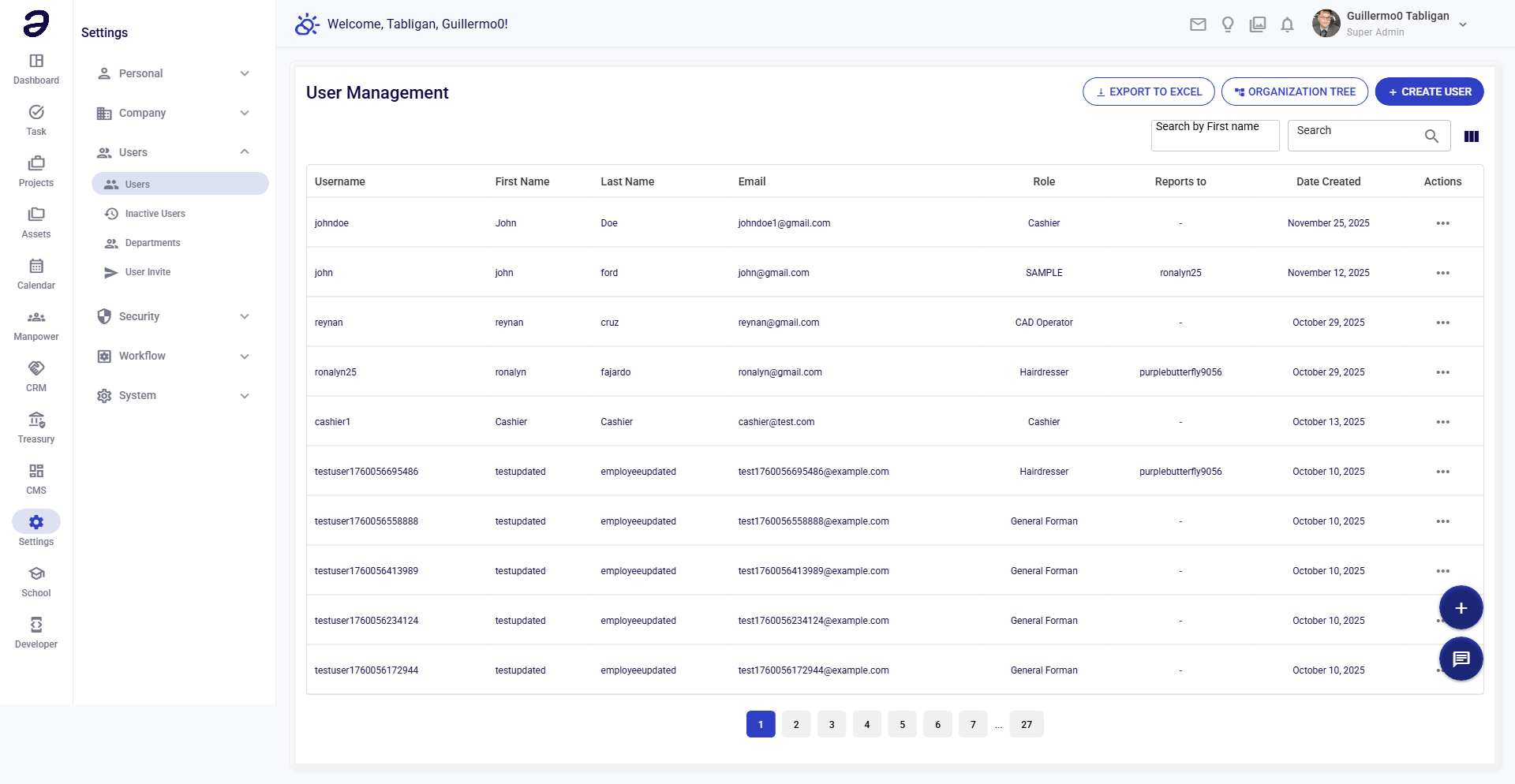
Overview
User management is central to system security. Control who can access the system, what they can see, and what actions they can perform.
Page Layout
- Add User button - Create new user
- Search - Find users
- Filter - Filter by department, role, status
- Users Table - List of all users
User Information
Each user profile includes:
| Field | Description |
|---|---|
| Username | Login username |
| Full Name | User's full name |
| Email address | |
| Department | User's department |
| Role | Assigned role |
| Branch | Assigned branch |
| Status | Active/Inactive |
| Last Login | Last access time |
Common Tasks
Creating a User
- Click + Add User
- Fill in required information:
- Username - Unique login name
- Full Name - User's name
- Email - Email address
- Password - Initial password
- Department - Select department
- Role - Assign permissions role
- Branch - Assign branch (if applicable)
- Click Create User
Editing User Information
- Find user in list
- Click on user or Edit
- Update information
- Click Save
Resetting User Password
- Open user profile
- Click Reset Password
- Enter new password
- Or send reset link to user's email
- Confirm reset
Deactivating a User
- Open user profile
- Change status to Inactive
- Save changes
Note: Deactivated users cannot log in but their data is preserved.
Reactivating a User
- Filter to show inactive users
- Find user
- Change status to Active
- Save
Changing User Role
- Open user profile
- Select new Role
- Save changes
- Permissions update immediately
User Status
| Status | Meaning |
|---|---|
| Active | Can log in and use system |
| Inactive | Account disabled |
| Pending | Awaiting activation |
| Locked | Locked due to failed logins |
Bulk Actions
For multiple users:
- Bulk Activate - Activate several users
- Bulk Deactivate - Deactivate several users
- Export - Download user list
Tips
- Strong Passwords - Enforce password requirements
- Regular Review - Audit user accounts
- Least Privilege - Give minimum needed access
- Deactivate Promptly - Disable departed employees
- Document Access - Track who has what access
Related Pages
- Inactive Users - Deactivated accounts
- Roles - Permission roles
- Departments - Department management
- User Invite - Invite new users
💡 Note: Regular user account review is essential for maintaining system security.