
All Tasks
View all tasks across the entire organization. Filter, search, and manage tasks from all projects and teams.
Overview
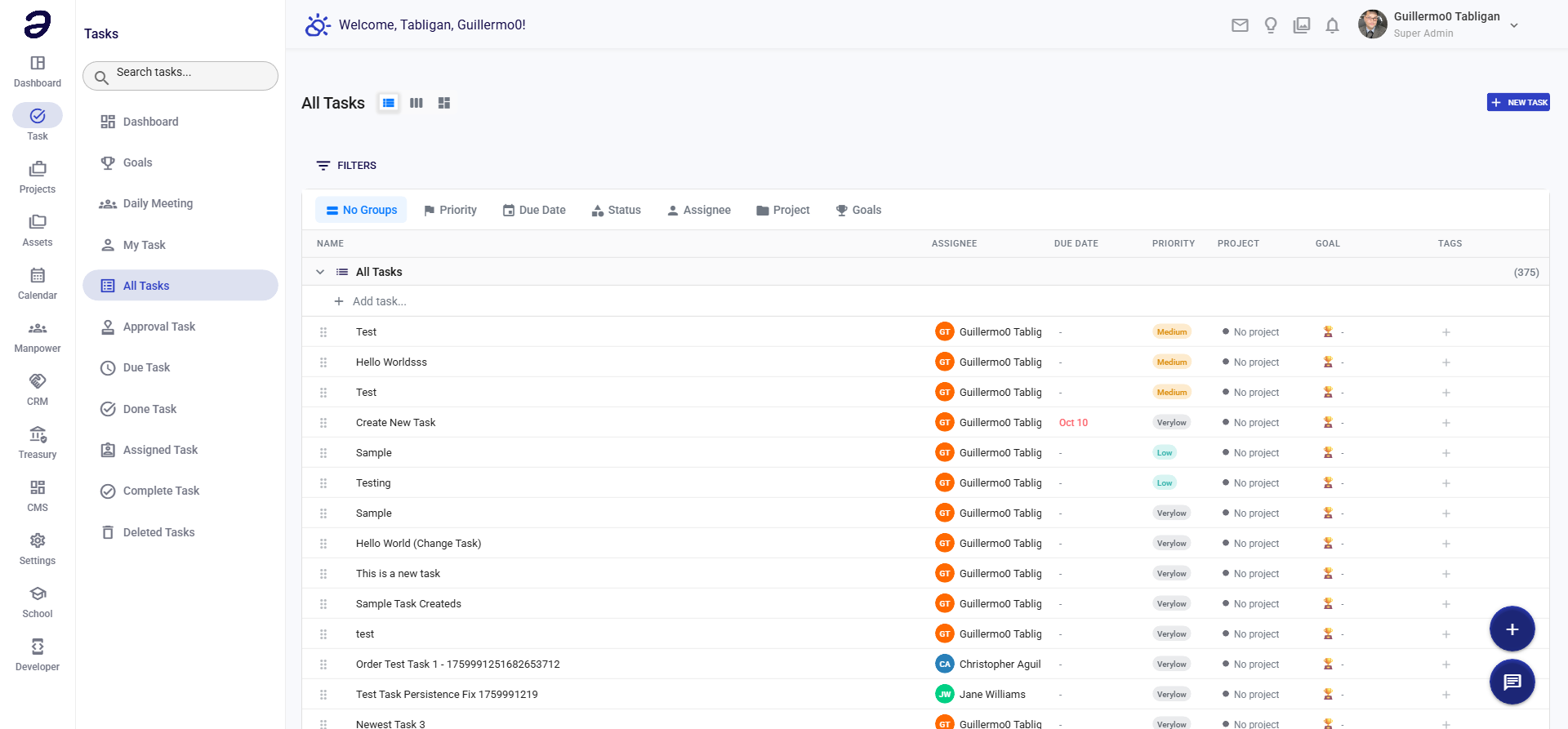
All Tasks provides a comprehensive view of every task in the system. This is useful for managers and administrators who need visibility across all work.
Page Features
Search and Filters
- Search Bar - Search tasks by title, description, or keywords
- Advanced Filters:
- Status filter
- Priority filter
- Project filter
- Assignee filter
- Date range filter
- Creator filter
Task List
- Displays all tasks in the system
- Shows comprehensive information:
- Task title
- Project/folder
- Status
- Priority
- Assignee
- Creator
- Due date
- Creation date
- Last update
View Options
- List View - Traditional list format
- Board View - Kanban board by status
- Calendar View - Tasks organized by date
- Table View - Detailed table with all columns
Actions Available
Task Actions
- View Task - See full task details
- Edit Task - Modify task information
- Change Status - Update task status
- Reassign - Change assignee
- Change Priority - Update priority level
- Add Comment - Add notes or updates
- Delete Task - Remove task
Bulk Actions
- Select multiple tasks
- Bulk status update
- Bulk priority change
- Bulk reassignment
- Bulk deletion
Export
- Export task list to CSV
- Export to PDF
- Print task list
Common Tasks
Finding a Specific Task
- Navigate to Task → All Tasks
- Use the search bar to find by title or keyword
- Or use filters to narrow down results
Filtering by Project
- Click on the Project filter
- Select the project from the list
- Tasks will be filtered automatically
Viewing Tasks by Status
- Use the Status filter dropdown
- Select desired status (Pending, In Progress, Done, etc.)
- View filtered results
Exporting Task List
- Apply any desired filters
- Click Export button
- Choose format (CSV or PDF)
- Download the file
Tips and Best Practices
- Use Filters - Combine multiple filters for precise results
- Save Filters - Save frequently used filter combinations
- Regular Review - Review all tasks periodically for visibility
- Export Reports - Export task lists for reporting purposes
- Monitor Status - Use status filters to track work progress
Related Pages
- Task Dashboard - Overview statistics
- My Task - Your personal tasks
- Approval Task - Tasks requiring approval
💡 Note: This page shows all tasks in the system. Use filters to focus on specific projects, teams, or statuses.